fullseye
tb_quat_normalize_image — 2D typed op
- データ種:
qimage→qimage - 呼び出し:
fullseye.apply(img, "tb_quat_normalize_image", a=0.5, b=0.5)(2-D は 1 画像 + 2 スカラつまみa,b∈[0,1]のモデル)
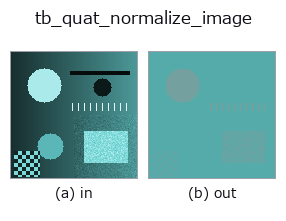
図は合成の入力 128×128 で実際に走らせた出力。左が入力、右が出力。点群は上から見た散布(明るさ = z)、1-D 列は折れ線、体積は z 方向の最大値投影、動画は中央フレーム、複素画像は振幅、絵にならない返り値は値そのもの。
つまみ a は出力を変えない(実測: 0.1 / 0.5 / 0.9 で同一)。
つまみ b は出力を変えない(実測: 0.1 / 0.5 / 0.9 で同一)。
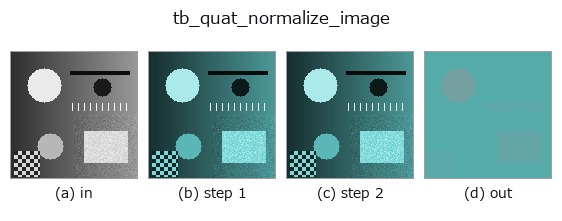
段階(前置きの op → この op。左から順):
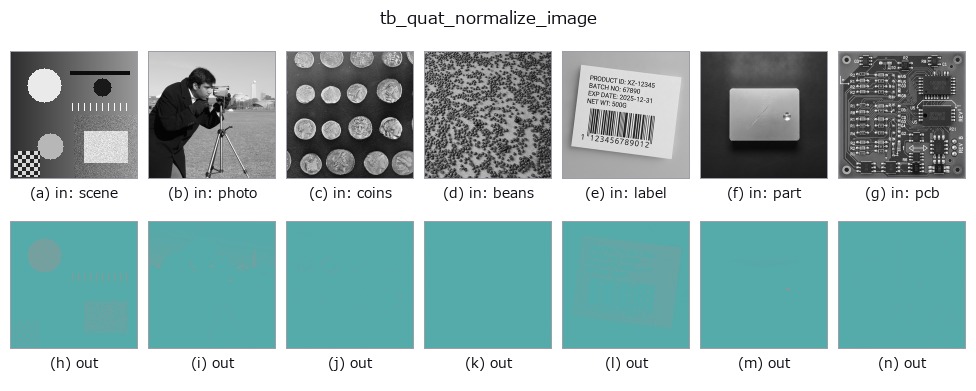
別の画像でも(合成シーン / 写真 / 硬貨。上段が入力、下段がその出力。つまみは既定):
使い方
Per-pixel normalisation to unit modulus. → (H, W, 4).
Fail-closed on a zero pixel. A quaternion image routinely contains exact
zeros — a black pixel is (0,0,0,0) — so the case is not hypothetical, and
a zero quaternion has no direction to normalise towards. It is refused by
name, with the count and the first offending pixel’s row and column in the
message, rather than divided by norm + eps: that idiom returns zero, and
a zero used as a rotor becomes the identity rotation with no exception
and no NaN to mark it. (pose_quat.quat_normalize did exactly that until
2026-09-01 and now fail-closes too; see :func:quat_color_rotate.)
Raises ValueError: any pixel has modulus 0.
Typed bridge of the quat op quat_normalize_image into the 2-D evolution registry: the same implementation, called under the op(v, a, b) convention. This op has no tunable parameter; a and b are unused.
参考(サンプルデータ・文献)
- サンプルデータ カタログ(DL URL / ライセンス) — 2-D は skimage.data(BSD/public)+ 合成、3-D は実データ源(Stanford/PDS 等)の DL URL。
- 演算子の来歴・参考文献 — この op 族の元になった研究/手法の出典。
Studio で試す
下のプログラムは実際に走ることを確かめてある(図と同じ入力)。Studio のヘルプではこのブロックがボタンになり、その場で読み込んで実行できる。
img_to_rgb 0.50 0.50
tb_rgb_to_quaternion 0.50 0.50
tb_quat_normalize_image 0.50 0.50
実行できる例(この op を実際に呼ぶ検証済みサンプル)
次の例は元の台帳 op quat_normalize_image を呼ぶもの。この橋渡し op は同じ実装を fn(v, a, b) 規約に合わせただけなので、挙動はそのまま当てはまる(呼び出し形だけ違う)。
- quaternion_monogenic —
py -3.11 examples/quaternion_monogenic.py
型が繋がる次の op(qimage を入力に取れる)
identity · tb_quaternion_to_rgb · tb_quat_norm · tb_quat_conjugate_image · tb_monogenic_amplitude · tb_monogenic_phase · tb_monogenic_orientation · tb_quat_color_rotate
同カテゴリ(typed)
tb_points_to_voxel · tb_estimate_point_normals · tb_iss_keypoints · tb_project_points · tb_render_point_depth · tb_points_render · tb_statistical_outlier_removal · tb_radius_outlier_removal
Provenance: ops.py — 2D operator registry. この per-op ノートは tools/opdocs.py md が自動生成(手編集しない)。
© 2026 Kazufumi Furuse — Fullseye operator documentation. Licensed under Apache-2.0.