fullseye
tac_pressure_proxy — 2D tactile op
- データ種:
image→image - 呼び出し:
fullseye.apply(img, "tac_pressure_proxy", a=0.5, b=0.5)(2-D は 1 画像 + 2 スカラつまみa,b∈[0,1]のモデル)
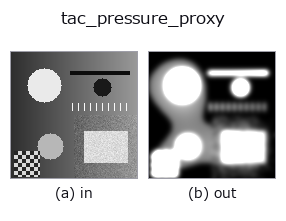
図は合成の入力 128×128 で実際に走らせた出力。左が入力、右が出力。点群は上から見た散布(明るさ = z)、1-D 列は折れ線、体積は z 方向の最大値投影、動画は中央フレーム、複素画像は振幅、絵にならない返り値は値そのもの。
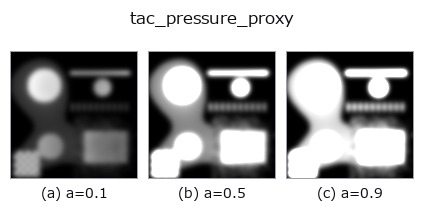
つまみ a を振る(0.1 / 0.5 / 0.9、もう一方は既定):
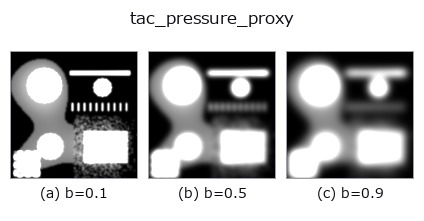
つまみ b を振る(0.1 / 0.5 / 0.9、もう一方は既定):
別の画像でも(合成シーン / 写真 / 硬貨。上段が入力、下段がその出力。つまみは既定):
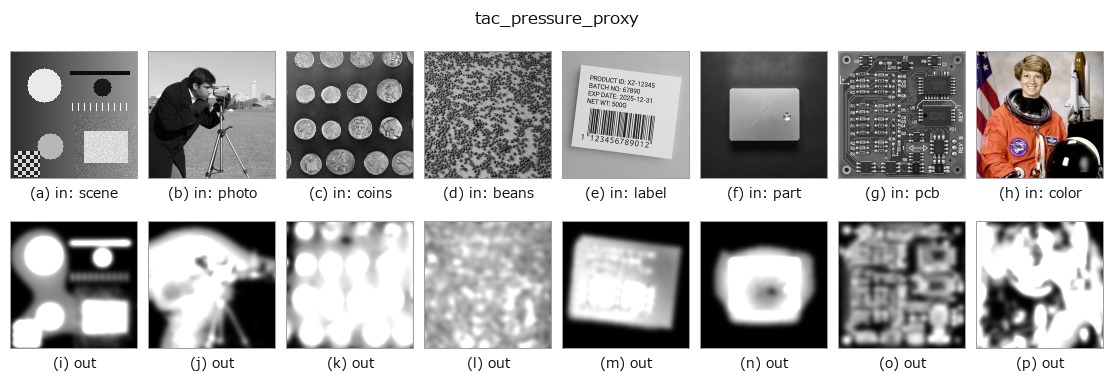
4 列目はカラー (H,W,3) の入力。この op は色を跨がずに扱える(色チャネルを 3 本目の空間軸として畳み込まない)。
使い方
Contact-pressure proxy map: the rectified deviation from the
pseudo-reference background dev = |v - G_sigma(v)| is gated to the
high-deviation (contact) area – a relative gate at 0.15 * max(dev) plus
an absolute floor of 0.005 – amplified by the sensitivity gain and
Gaussian-smoothed, which is the standard “indentation depth is monotone in
normal force” surrogate used when a tactile pad carries no force sensor.
a = sensitivity (gain 1..10x), b = smoothing radius (sigma 0.5..4.5).
Output clipped to [0,1], HxW; a flat frame yields an all-zero pressure map
(no contact, no force).
何も写っていないフレーム(実測): 明るさが一様な画像を入れると、明るさに関係なく空(全画素が背景 0)になる。真っ白でも真っ黒でも同じで、明るさそのものでは何も検出しない。
参考(サンプルデータ・文献)
- サンプルデータ カタログ(DL URL / ライセンス) — 2-D は skimage.data(BSD/public)+ 合成、3-D は実データ源(Stanford/PDS 等)の DL URL。
- 演算子の来歴・参考文献 — この op 族の元になった研究/手法の出典。
Studio で試す
下のプログラムは実際に走ることを確かめてある(図と同じ入力)。Studio のヘルプではこのブロックがボタンになり、その場で読み込んで実行できる。
tac_pressure_proxy 0.50 0.50
実行できる例(この op を実際に呼ぶ検証済みサンプル)
- sim2real_and_alife —
py -3.11 examples/sim2real_and_alife.py
型が繋がる次の op(image を入力に取れる)
identity · gaussian · mean_box · mean_box_wh · bilateral · kuwahara · unsharp · median
同カテゴリ(tactile)
tac_contact_mask · tac_height_from_shading · tac_surface_normal · tac_shear_field
Provenance: ops.py — 2D operator registry. この per-op ノートは tools/opdocs.py md が自動生成(手編集しない)。
© 2026 Kazufumi Furuse — Fullseye operator documentation. Licensed under Apache-2.0.