fullseye
gaussian — 2D smoothing op
- データ種:
image→image - 呼び出し:
fullseye.apply(img, "gaussian", a=0.5, b=0.5)(2-D は 1 画像 + 2 スカラつまみa,b∈[0,1]のモデル) - HALCON 相当:
gauss_filter(意味・パラメータは HALCON リファレンスが参考になる)
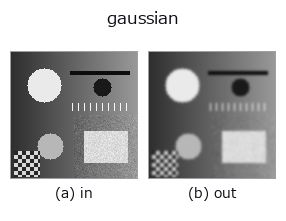
図は合成の入力 128×128 で実際に走らせた出力。左が入力、右が出力。点群は上から見た散布(明るさ = z)、1-D 列は折れ線、体積は z 方向の最大値投影、動画は中央フレーム、複素画像は振幅、絵にならない返り値は値そのもの。
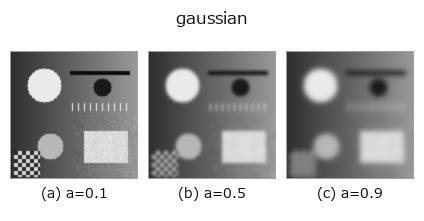
つまみ a を振る(0.1 / 0.5 / 0.9、もう一方は既定):
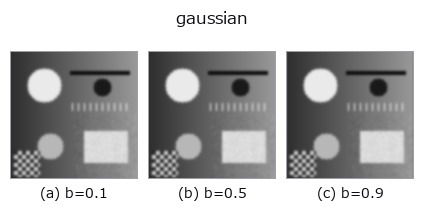
つまみ b を振る(0.1 / 0.5 / 0.9、もう一方は既定):
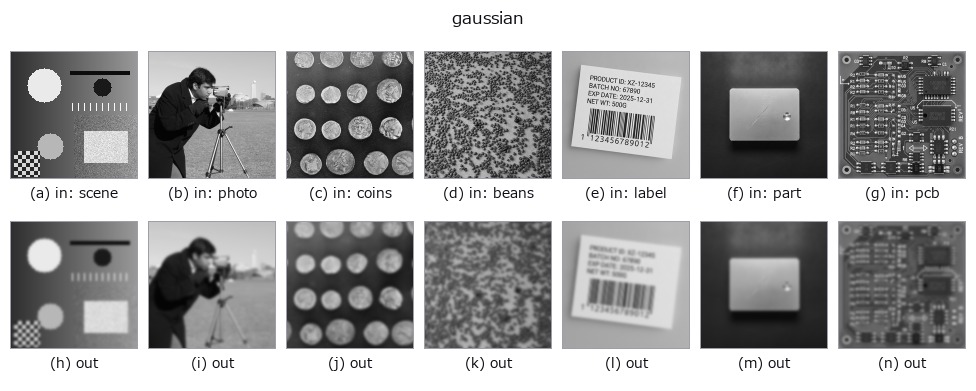
別の画像でも(合成シーン / 写真 / 硬貨。上段が入力、下段がその出力。つまみは既定):
カラー (H,W,3) の入力は載せていない: この op は色チャネルを 3 本目の空間軸として扱う(色を跨ぐ)ため。チャネルごとに分けて呼ぶこと。
使い方
等方ガウシアン平滑化。HALCON の gauss_filter(Smooth using discrete Gauss functions.)に相当。
a が標準偏差 σ を 0.3〜3.0 に線形に振る(σ = 0.3 + 2.7a)。b が端の扱いを選ぶ: b <= 0.5 で reflect(端画素を複製して折り返す。scipy の既定で、2026-09-17 までの挙動)、以降 nearest / constant(0 で埋める)/ wrap(反対側から巻き取る)。★σ が 0.375 未満(a が約 0.028 未満)だと reflect と nearest が原理的に一致する(scipy の窓の半径は int(4σ + 0.5) で、ここでは 1 画素。はみ出しが 1 画素なので複製先が同じ)—— 端の扱いを変えたのに結果が動かないときは、まず σ の小ささを疑うこと(σ = 1 では最大 0.05 程度変わる)。実装は scipy.ndimage.gaussian_filter。ノイズ除去や後段のエッジ検出前のぼかしに使う。σ が大きいほど細部が失われる。
詳しい使い方ガイド
参考(サンプルデータ・文献)
- サンプルデータ カタログ(DL URL / ライセンス) — 2-D は skimage.data(BSD/public)+ 合成、3-D は実データ源(Stanford/PDS 等)の DL URL。
- 演算子の来歴・参考文献 — この op 族の元になった研究/手法の出典。
- アルゴリズムの正典(著者・年)と用途は上記ファミリ使い方ガイドに記載。
Studio で試す
下のプログラムは実際に走ることを確かめてある(図と同じ入力)。Studio のヘルプではこのブロックがボタンになり、その場で読み込んで実行できる。
gaussian 0.35 0.50
実行できる例(この op を実際に呼ぶ検証済みサンプル)
- coherence_scanning —
py -3.11 examples/coherence_scanning.py - color_transport —
py -3.11 examples/color_transport.py - ct_inspection —
py -3.11 examples/ct_inspection.py - degenerate_inputs —
py -3.11 examples/degenerate_inputs.py - example_inner_diameter_mm —
py -3.11 examples/example_inner_diameter_mm.py - gallery2d_smoothing_rank —
py -3.11 examples/gallery2d_smoothing_rank.py - genspark_external_review —
py -3.11 examples/genspark_external_review.py - inspection_workflow —
py -3.11 examples/inspection_workflow.py - perf_pointcloud_descriptors —
py -3.11 examples/perf_pointcloud_descriptors.py - photon_timeresolved —
py -3.11 examples/photon_timeresolved.py - poc_bone_trabecular_thickness —
py -3.11 examples/poc_bone_trabecular_thickness.py - poc_chromatic_confocal —
py -3.11 examples/poc_chromatic_confocal.py - poc_dtof_ranging —
py -3.11 examples/poc_dtof_ranging.py - poc_flybrain_pointcloud —
py -3.11 examples/poc_flybrain_pointcloud.py - poc_interferometry_step —
py -3.11 examples/poc_interferometry_step.py - poc_itof_multifreq —
py -3.11 examples/poc_itof_multifreq.py - poc_leaf_disease_area —
py -3.11 examples/poc_leaf_disease_area.py - poc_nir_silicon_transmission —
py -3.11 examples/poc_nir_silicon_transmission.py - poc_nuclei_ploidy —
py -3.11 examples/poc_nuclei_ploidy.py - poc_simcal_telecentric —
py -3.11 examples/poc_simcal_telecentric.py - poc_simcal_thin_film —
py -3.11 examples/poc_simcal_thin_film.py - poc_solar_el_inspection —
py -3.11 examples/poc_solar_el_inspection.py - poc_solar_limb_darkening —
py -3.11 examples/poc_solar_limb_darkening.py - poc_star_astrometry —
py -3.11 examples/poc_star_astrometry.py - poc_wound_area_tracking —
py -3.11 examples/poc_wound_area_tracking.py - quickstart —
py -3.11 examples/quickstart.py - typed_results_json —
py -3.11 examples/typed_results_json.py - video_streaming —
py -3.11 examples/video_streaming.py
型が繋がる次の op(image を入力に取れる)
identity · mean_box · mean_box_wh · bilateral · kuwahara · unsharp · median · min_filter
同カテゴリ(smoothing)
mean_box · mean_box_wh · bilateral · kuwahara · unsharp · sk_tv · sk_wavelet · sk_rolling_ball
Provenance: ops.py — 2D operator registry. この per-op ノートは tools/opdocs.py md が自動生成(手編集しない)。
© 2026 Kazufumi Furuse — Fullseye operator documentation. Licensed under Apache-2.0.