fullseye
ph_mean_curvature_motion — 2D physics op
- データ種:
image→image - 呼び出し:
fullseye.apply(img, "ph_mean_curvature_motion", a=0.5, b=0.5)(2-D は 1 画像 + 2 スカラつまみa,b∈[0,1]のモデル)
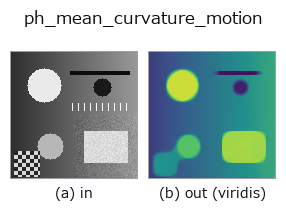
図は合成の入力 128×128 で実際に走らせた出力。左が入力、右が出力。点群は上から見た散布(明るさ = z)、1-D 列は折れ線、体積は z 方向の最大値投影、動画は中央フレーム、複素画像は振幅、絵にならない返り値は値そのもの。
出力は viridis 風の疑似カラー(暗い紫 = 小、黄 = 大)。距離・位相・向き・深度のような「量の場」を読むため。
つまみ a を振る(0.1 / 0.5 / 0.9、もう一方は既定):
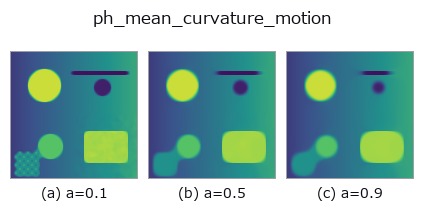
つまみ b は出力を変えない(実測: 0.1 / 0.5 / 0.9 で同一)。
別の画像でも(合成シーン / 写真 / 硬貨。上段が入力、下段がその出力。つまみは既定):
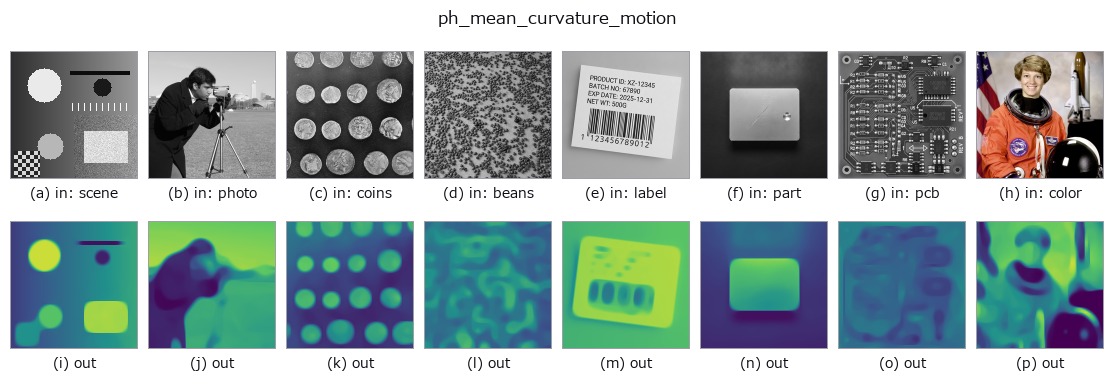
4 列目はカラー (H,W,3) の入力。この op は色を跨がずに扱える(色チャネルを 3 本目の空間軸として畳み込まない)。
使い方
Mean-curvature motion / curve-shortening flow (HALCON mean_curvature_flow).
Level-set curvature flow I_t = |grad I| * div(grad I / |grad I|), discretised
in the numerically stable form
I_t = (I_xx I_y^2 - 2 I_x I_y I_xy + I_yy I_x^2) / (I_x^2 + I_y^2 + eps).
Each level curve moves inward proportionally to its curvature, so a bright disk
shrinks and its boundary shortens (denoising / small-structure removal).
a sets the step count; b is unused.
詳しい使い方ガイド
参考(サンプルデータ・文献)
- サンプルデータ カタログ(DL URL / ライセンス) — 2-D は skimage.data(BSD/public)+ 合成、3-D は実データ源(Stanford/PDS 等)の DL URL。
- 演算子の来歴・参考文献 — この op 族の元になった研究/手法の出典。
- アルゴリズムの正典(著者・年)と用途は上記ファミリ使い方ガイドに記載。
Studio で試す
下のプログラムは実際に走ることを確かめてある(図と同じ入力)。Studio のヘルプではこのブロックがボタンになり、その場で読み込んで実行できる。
ph_mean_curvature_motion 0.50 0.50
実行できる例(この op を実際に呼ぶ検証済みサンプル)
- gallery2d_physics_alife_3d —
py -3.11 examples/gallery2d_physics_alife_3d.py
型が繋がる次の op(image を入力に取れる)
identity · gaussian · mean_box · mean_box_wh · bilateral · kuwahara · unsharp · median
同カテゴリ(physics)
ph_perona_malik · ph_coherence_enhancing_diffusion · ph_reaction_diffusion · ph_heat_flow · ph_total_variation_flow
Provenance: ops.py — 2D operator registry. この per-op ノートは tools/opdocs.py md が自動生成(手編集しない)。
© 2026 Kazufumi Furuse — Fullseye operator documentation. Licensed under Apache-2.0.