fullseye
hx_crop_contours — 2D halcon_ext op
- データ種:
contour→contour - 呼び出し:
fullseye.apply(img, "hx_crop_contours", a=0.5, b=0.5)(2-D は 1 画像 + 2 スカラつまみa,b∈[0,1]のモデル) - HALCON 相当:
crop_contours_xld(意味・パラメータは HALCON リファレンスが参考になる)
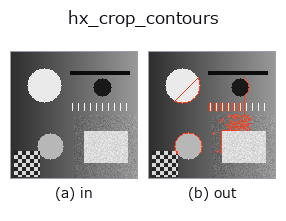
図は合成の入力 128×128 で実際に走らせた出力。左が入力、右が出力。点群は上から見た散布(明るさ = z)、1-D 列は折れ線、体積は z 方向の最大値投影、動画は中央フレーム、複素画像は振幅、絵にならない返り値は値そのもの。
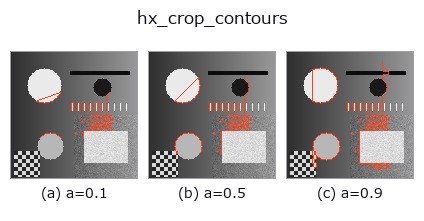
つまみ a を振る(0.1 / 0.5 / 0.9、もう一方は既定):
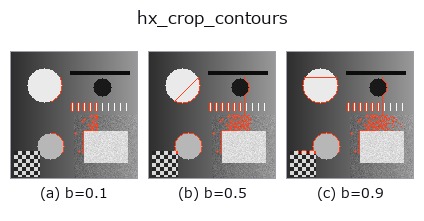
つまみ b を振る(0.1 / 0.5 / 0.9、もう一方は既定):
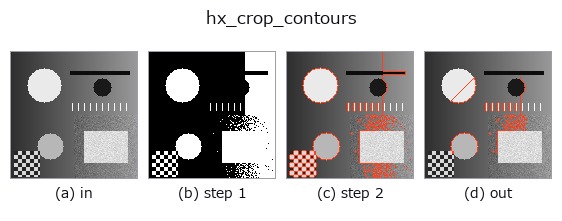
段階(前置きの op → この op。左から順):
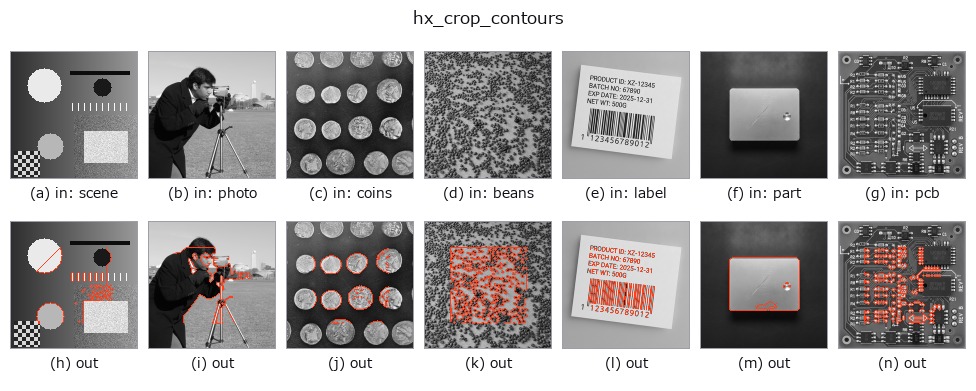
別の画像でも(合成シーン / 写真 / 硬貨。上段が入力、下段がその出力。つまみは既定):
使い方
contour を中央の a×b 割合の矩形に crop(範囲内の点のみ残す)。
各 contour の点のうち、画像中心 (H/2, W/2) からの距離が行方向 hh 以内かつ列方向 ww 以内のものだけを
残し、1 点も残らない contour は捨てて返す。
a→ 残す高さの半分hh = (0.3 + 0.6*a) * H/2(全体の 30%〜90%)。b→ 残す幅の半分ww = (0.3 + 0.6*b) * W/2(全体の 30%〜90%)。a=b=1 でも周辺 5% は落ちる。
点を間引くだけで分割しないので、矩形の外を回って戻る contour は残った点どうしがつながる(ジャンプ)。
矩形外を完全に無視したい場合は後段で hx_split_contours。余白を画像端から指定する版は hx_clip_contours、
1 つのノブで正方形窓にする版は xg_crop_contours。
詳しい使い方ガイド
参考(サンプルデータ・文献)
- サンプルデータ カタログ(DL URL / ライセンス) — 2-D は skimage.data(BSD/public)+ 合成、3-D は実データ源(Stanford/PDS 等)の DL URL。
- 演算子の来歴・参考文献 — この op 族の元になった研究/手法の出典。
- アルゴリズムの正典(著者・年)と用途は上記ファミリ使い方ガイドに記載。
Studio で試す
下のプログラムは実際に走ることを確かめてある(図と同じ入力)。Studio のヘルプではこのブロックがボタンになり、その場で読み込んで実行できる。
threshold 0.50 0.50
sk_find_contours 0.50 0.50
hx_crop_contours 0.50 0.50
実行できる例(この op を実際に呼ぶ検証済みサンプル)
- gallery2d_halcon_ext —
py -3.11 examples/gallery2d_halcon_ext.py
型が繋がる次の op(contour を入力に取れる)
identity · select_contours · smooth_contours · fit_line_contours · contours_to_region · count_contours · total_length · select_contours_xld
同カテゴリ(halcon_ext)
hx_gen_circle · hx_gen_ellipse · hx_gen_rectangle2 · hx_gen_checker_region · hx_gen_grid_region · hx_gabor · hx_fit_surface1 · hx_fit_surface2
Provenance: ops.py — 2D operator registry. この per-op ノートは tools/opdocs.py md が自動生成(手編集しない)。
© 2026 Kazufumi Furuse — Fullseye operator documentation. Licensed under Apache-2.0.